

Data health in your CRM is an ongoing battle. If you were working with just one static moment in time that never changed, you might be able to have clean data once and for all. But we all know that's not real life. Your CRM data is constantly changing every hour of every day: new contacts, opportunity stage updates, job changes, logged emails, meeting notes, and so on and so on. This means that CRM data health is an ongoing maintenance task, kind of like mopping the floor. And imagine if you went on strike with floor mopping.
At least you can see a dirty floor. Seeing dirty data is a bit trickier. Not to mention that your data quality standards for today might not be up to your standards tomorrow. That said, there are a lot of ways we’ve tried to make data health easier. Filtered lists, automatically assigned tasks, etc. But what did we find? Most of the more attention-grabbing methods (like setting tasks via a workflow) overwhelmed the people they were supposed to help. The more subtle methods, like filtered lists, were a little too subtle. In fact, they were almost entirely forgotten about.
We sat down and tried to find a method that made data health arguably fun. So we set up something that turns data health tasks into something we want to do.
RevOps specialist Todd Sprinkel at Sponge.io likes to call this concept the "dashboard of zero." Basically, you build reports that display a count of anything you don't want to see in your CRM data. If anything shows up in this "dashboard of zero," you resolve it in the CRM, so the report shows a big old goose egg instead of a count of records with errors. On this dashboard, you create a report for each type of bad data that you’re tracking. The idea is to click into them, fix the errors, and get that number back down to zero.
So? You wake up, you open the dashboard, you see zeros, and you walk into the day with a clean conscience about your numbers. Or, you tackle the few records that popped up in the reports and go on with your day. No matter how you spin it, you know what you’re looking at, and you know when the task is done. The dashboard shows you the same things you were looking for before. The difference is how quickly you’re able to see the gaps and how easy it is to correct them. That’s the magic of the Dashboard of Zero.
What reports are on our own Dashboard of Zero? Here’s a peek.
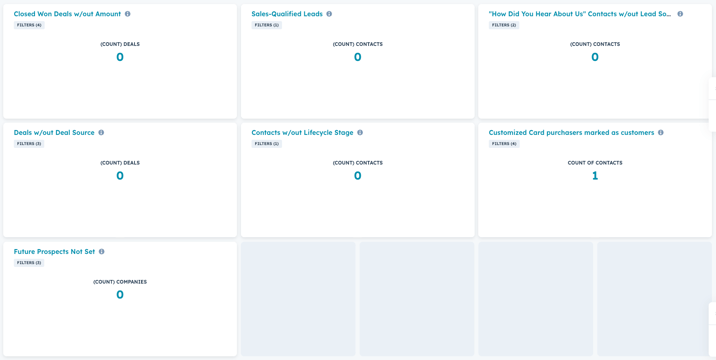
Now let's look at what each of these individual reports track:
Closed Won Deals w/out Amount
Whenever we win a new deal in our sales pipeline, we want to know the deal's dollar amount. As a consulting company, we sometimes don't know the final dollar amount of a consulting engagement. Sometimes, a contract we project for 6 months will later be extended for additional time, or even indefinitely. But we still want to have a forward-looking estimate, so we will put in a dollar amount on the deal based on the line-items within the deal. For instance, a deal with a line-item for 6 months of a $6,750/month retainer would get a total deal dollar amount of $40,500.
Sales-Qualified Leads
We use the following lifecycle stages in our customer journey: Lead → Sales-Qualified Lead → Opportunity → Customer → Former Customer. When a contact expresses interest in working with us - for instance, if they book a meeting with our Account Executive - then we mark their lifecycle stage as a Sales-Qualified Lead (SQL). We take an "up or out" approach with our SQLs: we screen them and either create a deal in our pipeline, which then moves their lifecycle stage to Opportunity, or we disqualify them. Examples of disqualifications include job seekers, "not now but later" people, and solicitors. If they're a job-Seeker, they move to an "Other" lifecycle stage. If they're not yet qualified but might become qualified later, we move their stage back to Lead. If they're just a solicitor (or spam), then we delete their contact record out of our HubSpot portal altogether. But we never just keep someone in the Sales Qualified Lead stage.
“How Did You Hear About Us” Contacts w/out Lead Source
We use this report because attribution needs two kinds of truth at the same time. The self-reported “How did you hear about us” field captures human detail, like “my colleague sent your newsletter” or “I met you at a conference,” and that detail helps messaging and sales context. Our Lead Source dropdown field gives us a set of categories (like organic search or former customer) that reporting can group, trend, and compare across quarters. We need to make sure that all contacts who filled out self-reported attribution have their "how did you hear about us?" response distilled down (along with their web analytics data) into one of our defined lead source categories.
When this report stays at zero, marketing knows they’ve got enough structured attribution info to trust that they’re investing in the right channels. When the number climbs, we can see that decisions might be resting on shaky data. We use the report to maintain the pairing of the single-line text field and the dropdown for trustworthy context.
Deals w/out Deal Source
We use this report to protect the integrity of pipeline attribution. Deal Source tells us which motion created the opportunity, which keeps pipeline by source, revenue by source, and sales motion analysis grounded. A clean Deal Source field also makes our decisions sharper, because we can compare cycle length, win rates, and deal quality across different sources.
When this report shows anything more than zero, we investigate where Deal Source got skipped. Kind of like our “How did you hear about us” fields, this helps us see where real opportunities are coming from and maintain consistent data. A zero count here means we know our portal tells a consistent story across marketing and sales.
And why do we have a Deal Source field in addition to Contact Source fields? Because oftentimes multiple contacts are associated with the deal, and the sources of the various contacts aren't necessarily the same with each other or with the trigger event that created the deal.
Contacts w/out Lifecycle Stage
We use this report because the lifecycle stage is one way we make sure every contact gets the follow-up they need. Lists, routing, suppression rules, nurture logic, and conversion reporting all depend on the lifecycle stage being present and up-to-date. When the lifecycle stage field stays populated, our CRM behaves like a system that can make decisions at scale.
When the lifecycle stage goes missing, everything becomes manual faster than you might expect. Workflows stop firing consistently, follow-ups for real people get missed, and funnel reporting loses its reliability. This report gives us a fast way to catch the gap before it spreads.
Customized Card Purchasers Marked as Customers
This one is specific just to us at ClearPivot. We created some free HubSpot Content Hub modules and published them on the HubSpot Marketplace. Whenever someone downloads one of our modules, HubSpot creates their contact record in our account, and marks them as a customer. But since it's just a free module, we don't actually consider them customers. So we move their lifecycle stage back to Lead. This report helps us catch any contacts that might have slipped through the cracks.
Future Prospects Not Set
A huge amount of our business comes from repeat customers and existing connections. But not all our customers or sales prospects will be a good fit for us in the future. So whenever someone becomes a former customer, or an opportunity with a closed lost deal in our pipeline, we decide whether or not they could become a prospect for us again in the future. If we think they might, we will mark their Future Prospect property as "Yes," and will follow up with them roughly twice a year going forward. If we think they are not a good future fit, we will mark their Future Prospect property as "No," and won't follow up with them going forward.
And that's how we use a "dashboard of zero" to keep our CRM data organized and actionable. For every data hygiene task, rather than individually clicking through all the records and properties and filter every time, we just build a counter to track which records have data that we don't want to see, and then each month we'll fix our records as needed until the counters show zero records with the undesirable data situations.
So, if you find your data health tasks are constantly getting sidelined, make it fun. A dashboard of zero turns CRM hygiene into a task that you actually want to do.
