

If you're running email marketing through HubSpot, there's a good chance you're paying for contacts who will never hear from you again. The good news is there’s an easy, automated solution that you can implement today.
At ClearPivot, one of the first things we look at when auditing a client's HubSpot portal is their marketing contact list. More often than not, it's bloated with hard bounces and full unsubscribes. These are contacts that HubSpot won't email, but that the company is still being billed for. The fix is straightforward: move them to non-marketing contact status.
Here are the three most common offenders:
-
Contacts who have unsubscribed from all emails
-
Contacts who have hard bounced
-
Contacts who have quarantined emails
Who should be moved
Three groups of contacts are safe to convert to non-marketing status:
-
Contacts who have unsubscribed from all email.
Note the emphasis on all. HubSpot tracks both global unsubscribes and subscription-type-specific opt-outs. If someone only opted out of, say, your promotional emails but still receives your newsletter, they're still a valid marketing contact. You only want to act on contacts where the "Unsubscribed from all email" property is true. -
Contacts who have hard bounced.
HubSpot automatically stops sending to hard-bounced emails, but they still count against your marketing contact total. Hard bounces typically mean the email address no longer exists. Soft bounces, on the other hand, are usually temporary delivery issues — leave those alone. -
Contacts with emails that are quarantined.
Contacts can be quarantined by HubSpot if they show signs of suspicious activity. This can include:-
They contribute to a high hard bounce rates on multiple emails
-
They generate spam complaints from other email services
-
They have a history of bouncing across other HubSpot accounts
-
They were added through suspicious form activity
-
How to set it up in HubSpot
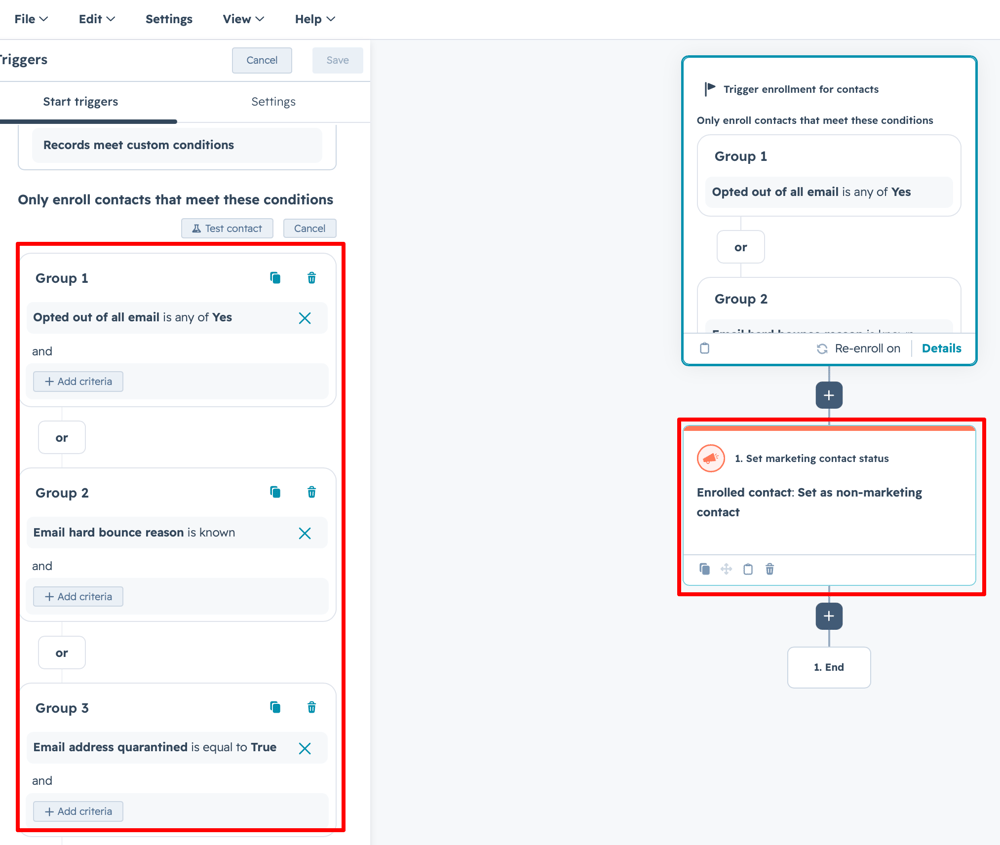
The cleanest way to automate this is with a workflow. Use these three properties as enrollment triggers:
-
"Opted out of all email" is any of Yes
-
"Email hard bounce reason" is Known
-
“Email address quarantined” = True
A couple of properties that look similar but shouldn't be used here:
-
"Opted out of [subscription name]" — this only captures single subscription opt-outs, not global unsubscribes
-
"Marketing emails bounced" — this is a numeric field that increments on both hard and soft bounces, so it will create false positives
One more thing to note
Marketing contacts don't convert to non-marketing status immediately. HubSpot processes these changes at the end of each calendar month, so don't be alarmed if you don't see the update right away.
This is a small workflow to set up and an easy win for keeping your HubSpot costs in check. If you'd like help building it out or auditing your current contact list, reach out to us! We'd love to help.
