

The Client
You try to provide your employees with the best tools for their job. But when the tools don’t work as well as expected, or in the ways you need most, the result can be a frustrating mix of wasted time and lost opportunities.
This well-established company helps organizations streamline their technology infrastructure and security to better align their systems and reduce risk. Their business model includes on-premises support, so, for practical reasons, all their clients must be located within a certain radius of the firm’s office locations around the country. Given these specific in-market vs. out-of-market parameters, not every lead that enters the system is viable for follow-up.
It takes complete, accurate data to effectively qualify incoming leads. But with two different platforms in play and frequent syncing problems, work was not going smoothly. The marketing manager was overwhelmed, tasked with troubleshooting and fixing sales rep user issues on top of doing actual marketing work.
Until one of the sales reps introduced her to ClearPivot.
The Challenge
This company uses ConnectWise for quoting and HubSpot for marketing and sales management. However, because the platforms were not well integrated, sales reps had to bounce back and forth between them to enter or update the information required to follow up with leads and close deals. It was a time-consuming hassle and left the door wide open for gaps and mistakes. Some sales reps just “winged it” instead of following the prescribed process; others kept information in their head rather than dealing with duplicate manual input.
The need for better integration was obvious, as the goal was to keep sales reps working in HubSpot rather than jumping between multiple platforms.
This is a difficult problem for companies to successfully address on their own. You may have a great internal IT team, but they don’t have the deep, multi-platform experience to craft detailed customizations. And even if your integration does allow data to flow as needed, sales reps aren’t technicians who can automatically make things work in the most effective way.
The Solution
Initially, the ClearPivot team tried to fix what was broken in the existing integration, especially to ensure everything flowed in the proper order. However, we quickly recognized that the integration itself did not accomplish what the company needed.
So we backed up a bit and built an Entity Relationship Diagram. Because our experts understand how both platforms are supposed to work together and the order in which things are supposed to move, we can map it out. The Entity Relationship Diagram shows all the property values in HubSpot that get mapped to all the property values in ConnectWise. Now we can see what rules or criteria are needed to make that happen. We have a process map.
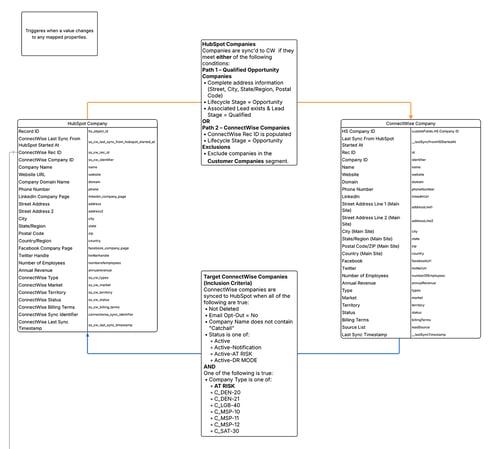
For the integration to work as needed, a lot of information – properties and values – must be copied from one platform to the other. That means following two different sets of rules with proper mapping and rule definition. Without that, there will be breaks that may be hard to track down. This is critical because if the initial relationships within the integration are not right, nothing else will work right.
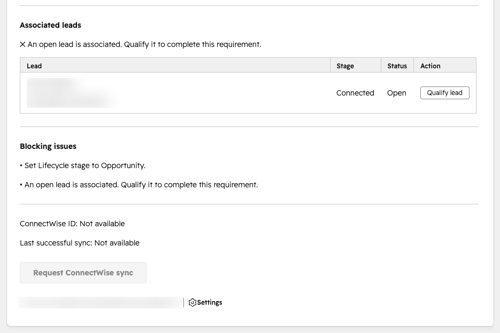
With the Entity Relationship Diagram in hand, we then performed several specific integrations, building detailed user workflows to help make day-to-day life easier for the sales reps. For example, we built a custom card in HubSpot that alerts the sales rep when a HubSpot record is ready to sync with ConnectWise. Or, if the record is not ready, the card identifies what’s missing so the sales rep can fix it and move forward. A required field may still be blank, or the lifecycle stage may need to be updated. This pop-up “lead create” form puts everything the rep needs to make the sync work on a handy little card.
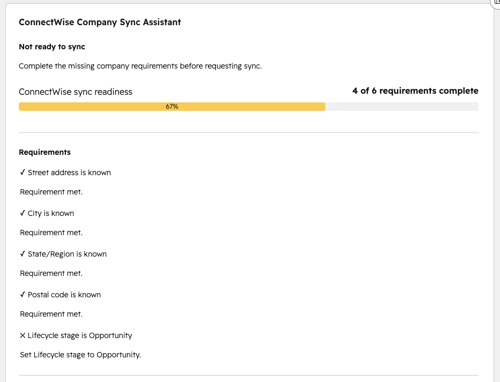
In this example, the integration handles the actual data transfer between the two platforms, but our experts’ technical skills and platform experience allowed us to create an easy, user-friendly format to trigger the integration and help sales reps quickly troubleshoot problems themselves.
Results
Things need to be done in a very specific order for any integration between two platforms to work properly. ClearPivot worked to map out that process and then provide troubleshooting tools that continue to save everyone time and make tasks easier. The company is now getting the most out of its software investment.
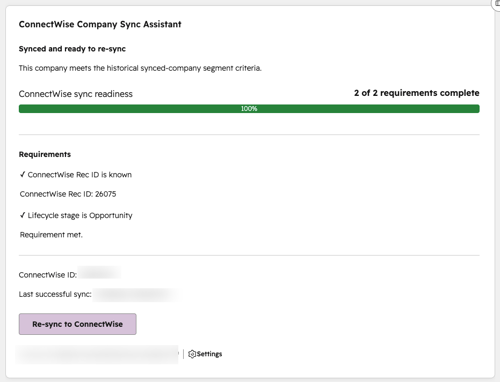
Something as seemingly simple as the lead creation form can make a dramatic difference for multiple team members. It is essentially a checklist that provides progressive assistance to confirm all fields are filled in and correctly associated to enable syncing. Sales reps can work more easily. And if a problem occurs, they can use the checklist to find where and why. That means the marketing manager no longer has to field multiple requests for help or waste even more time fixing problems or coaching sales reps on how to handle the fix.
Ultimately, it is the little details that determine whether platform integration works the way you need it to. The complexity cannot be understated. Partnering with ClearPivot brought this client the insight, expertise, and technical creativity to achieve integration that works just as they hoped it would.
